
Download FLV com FLV Downloader – Fast, Free & Secure Video Grabber
Overview
FLV com FLV Downloader is a lightweight desktop utility that lets you grab and save online video clips with just a few clicks. Designed for both casual viewers and content creators, the tool targets the ever‑growing demand for a quick, reliable way to download Flash‑based (FLV) videos from the web. While the internet is flooded with streaming media, many users still need a local copy for offline viewing, presentations, or archival purposes. FLV Downloader meets that need by offering a simple interface, rapid download speeds, and an integrated video converter that removes the compatibility headaches that often accompany FLV files. Whether you’re watching tutorials on a Windows PC, a Mac laptop, or planning to watch the same clip later on a mobile device, the software promises a secure, free download experience without intrusive ads or hidden fees. The built‑in converter expands the utility beyond FLV, allowing you to transform videos into popular formats such as MP4, AVI, WMV, or even extract audio as MP3. This flexibility makes FLV Downloader a handy companion for anyone who regularly consumes video content across more than 50 supported websites. In addition to downloading, the application provides a mini‑player for quick previews, an activity log for tracking progress, and optional automatic conversion for premium users. Overall, FLV com FLV Downloader balances ease of use with essential features, positioning itself as a go‑to tool for fast video capture and format conversion.
Key Features that Set FLV Downloader Apart
- Simple URL‑based download – paste the video link and start downloading instantly.
- Support for over 50 video‑hosting sites, including YouTube, Vimeo, Dailymotion, and niche flash portals.
- Built‑in video converter capable of outputting to MP4, AVI, WMV, MOV, and MP3 audio.
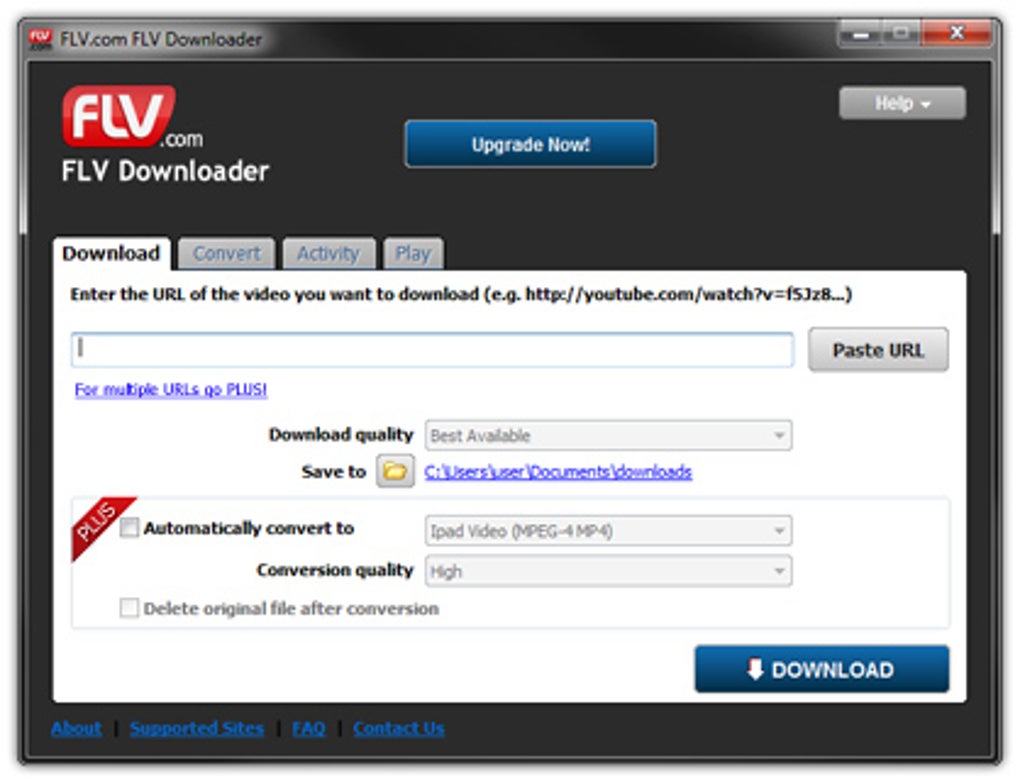
- Four‑tab interface (Download, Convert, Activity, Play) that keeps tasks organized and easy to manage.
- Progress monitoring with pause, resume, and cancel options directly from the Activity tab.
- Mini‑player for quick video previews without leaving the application.
- Automatic conversion for FLV Downloader Plus subscribers – saves a step for power users.
- Lightweight footprint – runs smoothly on older hardware and consumes minimal system resources.
- Free version available with no mandatory registration, ensuring quick access for occasional users.
- Secure download engine that verifies source URLs to protect against malicious links.
The feature set is intentionally kept focused on the core tasks of downloading and converting, avoiding the bloat that often accompanies “all‑in‑one” media suites. Users who need basic editing tools will have to look elsewhere, but the streamlined approach translates into faster load times and a reduced learning curve. The application also offers a batch‑download mode for Plus members, enabling the simultaneous processing of multiple URLs—an invaluable time‑saver for educators or marketers curating video libraries. Because the converter runs locally, there’s no need to upload files to an online service, preserving privacy and ensuring that large files remain under the user’s control. Overall, FLV Downloader’s feature list emphasizes speed, compatibility, and simplicity, making it a practical choice for everyday video‑grab tasks.
Installation & Usage Instructions – Get Started in Minutes
Installing FLV com FLV Downloader is a straightforward process that takes less than five minutes on most systems. Begin by navigating to the official download page and clicking the “Download Free Version” button. The installer is a small .exe file for Windows or a .dmg for macOS, each digitally signed to assure authenticity. Once the file is saved, run the installer and follow the on‑screen prompts: accept the license agreement, choose an installation folder (the default works for most users), and click “Install.” After installation, launch the program from the desktop shortcut or the start menu. The first launch will display a brief welcome screen that highlights the four main tabs.
Downloading a video is as simple as copying the video’s URL from your browser, pasting it into the “Video URL” field on the Download tab, and selecting a destination folder. Click “Start Download,” and the progress bar will appear in the Activity tab. For premium users, you can enable the “Convert automatically after download” checkbox to have the file transformed into your chosen output format without extra steps. Free users can manually convert the file later by switching to the Convert tab, browsing to the downloaded FLV, selecting the desired output format from a drop‑down menu, and hitting “Convert.”
The Convert tab mirrors the Download interface but adds options for batch conversion and custom output settings such as resolution and bitrate. Once conversion is complete, the newly formatted file appears in the Activity log, and you can open the output folder directly from the interface. The Play tab provides a compact media player for previewing both downloaded and converted files. Although the player is not intended for full‑length viewing, it’s handy for confirming that the correct clip was captured before committing to a conversion. Finally, the Activity tab serves as a central hub where you can pause, resume, or cancel ongoing tasks, making it easy to prioritize urgent downloads.
Throughout the process, FLV Downloader displays clear status messages and error alerts if a URL is unsupported or if network issues arise. The software also checks for updates automatically, prompting you to install the latest version to maintain compatibility with new streaming sites and security patches. In short, the installation and usage workflow is designed to be intuitive for both beginners and experienced users, ensuring that you spend more time watching videos and less time wrestling with complicated settings.
Compatibility & System Requirements
FLV com FLV Downloader is built to run on the most common desktop operating systems, offering broad compatibility without sacrificing performance. The application is officially supported on:
- Windows 7, 8, 8.1, 10, and 11 (both 32‑bit and 64‑bit architectures).
- macOS 10.12 (Sierra) and later, including the latest macOS Ventura.
While the core functionality works on all listed platforms, the built‑in converter relies on system codecs that may vary between Windows and macOS. For example, MP4 output utilizes H.264 encoding, which is natively supported on both OSes, but AVI output may require additional codec packs on older Windows installations. The software does not currently offer native Android or iOS versions; however, the converted files can be transferred to mobile devices for playback.
Minimum hardware requirements are modest: a 1 GHz processor, 512 MB of RAM, and at least 100 MB of free disk space for the application itself. Because video conversion is CPU‑intensive, users working with high‑resolution files or batch conversions will benefit from a multi‑core processor (dual‑core or better) and at least 2 GB of RAM to avoid slowdowns. Disk space for the output files depends on the source video length and chosen format; a typical 10‑minute HD clip in MP4 may occupy 100 MB, whereas the same clip in AVI could be twice as large.
The software adheres to standard Windows security policies, requiring no administrative privileges for everyday use after installation. On macOS, the first launch may prompt you to allow the app to access the “Downloads” folder; granting this permission ensures seamless saving of files. Network requirements are modest as well—any broadband connection with at least 1 Mbps download speed will handle most FLV streams, though faster connections improve overall download times and reduce buffering during conversion.
In summary, FLV Downloader’s compatibility matrix covers the majority of desktop environments used today, delivering a consistent experience across Windows and macOS while maintaining low system overhead. Users with older hardware should still be able to download and convert videos, albeit with longer processing times.
Pros, Cons & Frequently Asked Questions
Pros
- Free version available with no mandatory registration.
- Fast download speeds and intuitive URL‑paste workflow.
- Built‑in converter supports multiple output formats, eliminating the need for third‑party tools.
- Lightweight design runs smoothly on older PCs and Macs.
- Activity log with pause/resume gives users control over multiple downloads.
Cons
- No native mobile app for Android or iOS.
- Lacks advanced video editing features such as trimming or captioning.
- Automatic conversion is locked behind the paid Plus subscription.
- Mini‑player is basic and not suitable for full‑screen playback.
- Limited codec support on some older Windows systems may require extra installations.
FAQ – Your Questions Answered
Is FLV com FLV Downloader really free?
Yes, the basic version of FLV Downloader can be downloaded and used at no cost. It allows you to download videos and manually convert them. The automatic conversion feature is part of the optional FLV Downloader Plus subscription.
Which websites are supported for video download?
The tool supports more than 50 popular video‑hosting platforms, including YouTube, Vimeo, Dailymotion, Metacafe, and many flash‑based sites. A full list is provided on the official website and is regularly updated.
Can I convert a downloaded video to MP3 for audio‑only use?
Absolutely. The built‑in converter includes an MP3 output option, letting you extract audio from any downloaded video with a single click.
Is the software safe from malware and adware?
Yes. The installer is digitally signed, and the program does not bundle third‑party adware. It also runs a URL verification routine to help protect users from malicious links.
How do I update FLV Downloader to the latest version?
The application checks for updates automatically on launch. When a new version is detected, a prompt appears offering to download and install the update. You can also manually download the latest installer from the official website.
Overall, FLV com FLV Downloader delivers on its promise of quick, free video downloading and format conversion. While it lacks some advanced editing tools, its simplicity, speed, and broad compatibility make it a solid choice for everyday users.
Conclusion – Should You Download FLV com FLV Downloader?
If you regularly need to save online videos for offline viewing, FLV com FLV Downloader offers a compelling mix of speed, ease of use, and format flexibility—all without demanding a hefty price tag. The free version covers the essential workflow of pasting a URL, downloading the file, and converting it to a more universal format like MP4 or MP3. For power users who crave automatic conversion or batch processing, the optional Plus upgrade provides those extra conveniences without forcing anyone to pay. Although the tool does not replace a full‑featured video editor, its lightweight design ensures that it runs smoothly on older machines and consumes minimal system resources.
Security is another strong point: the installer is signed, there’s no bundled adware, and the software verifies source URLs before downloading. Compatibility spans Windows 7‑11 and macOS 10.12+, and the output formats are recognized by virtually every media player and mobile device. While the absence of a native mobile app and the limited editing capabilities may be deal‑breakers for a few, most users will find that the pros far outweigh the cons.
Ready to give it a try? Download FLV com FLV Downloader now and start building your personal video library today. The free version lets you test all core features instantly, and if you later decide you need automatic conversion or batch downloads, upgrading to Plus is just a click away.







